

Church Directory
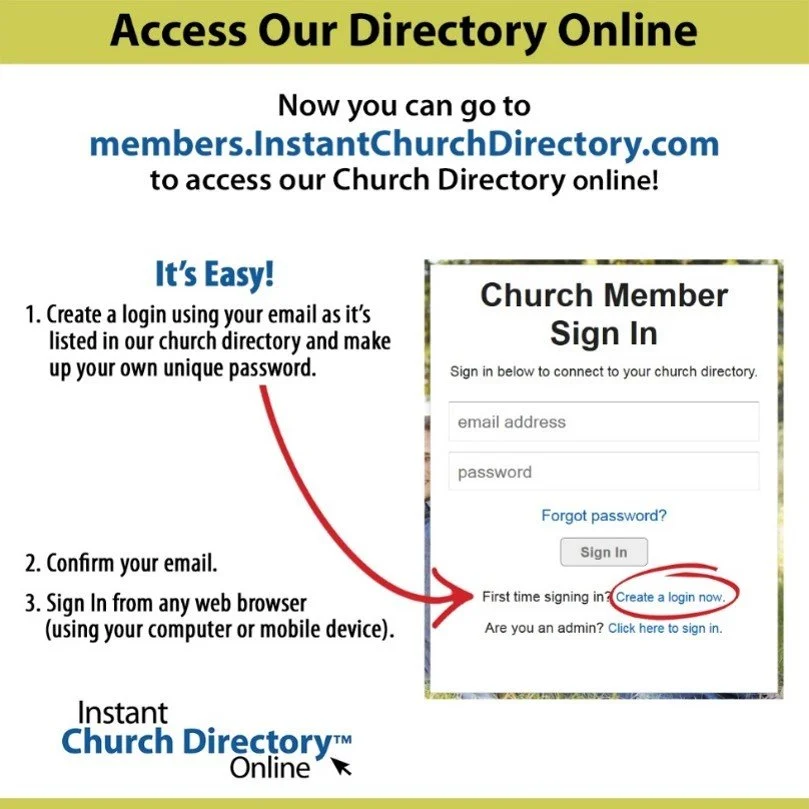
Borculo CRC uses Instant Church Directory so that members can securely access names, addresses, and phone numbers for other members. Below you will find instructions for logging into Instant Church Directory either online or via the app on your phone.
This is a secure site, and members cannot get this information without setting up a password. It is not public, and it is never shared.
How to Login to Instant Church Directory
To access the directory, you must use the email address that is currently in the directory. If you’re uncertain what email address is being used, please contact Kailyn Clay to double check!
Sign Up Online
Click on the link above to access the directory. Choose the link that says, “create a log in now.” You will be asked for your email address and a password. After you submit that, you will receive an email confirming that you signed up. The email will have a link to the online directory site.
Sign Up on the App
You can add the app to your phone by going to your app store and typing in Instant Church Directory.
Choose the link that says, “create a log in now.” You will be asked for your email address and a password. After you submit that, you will receive an email confirming that you signed up. The email will have a link to the online directory site.
Requesting Changes to the Church Directory
If your contact information changes, you can make edits directly from the app or the website.
From the app homepage, choose "Menu," then "Edit My Family." Make the necessary changes and then choose "Submit Edits" at the bottom of the page.
On the website, click “Edit My Family” in the upper right-hand corner, make the necessary changes, and then choose “Submit Edits.”
If you need assistance, please contact Kailyn Clay (616-648-7057 or kailynclay16@gmail.com).